Do you see this error at element_schema_registry.d.ts in Visual Studio 2015 when you try to build your app? Delete and rehydrate your node_modules folder to fix this.
Tuesday, February 7, 2017

I found this image yesterday and thought it was cool.
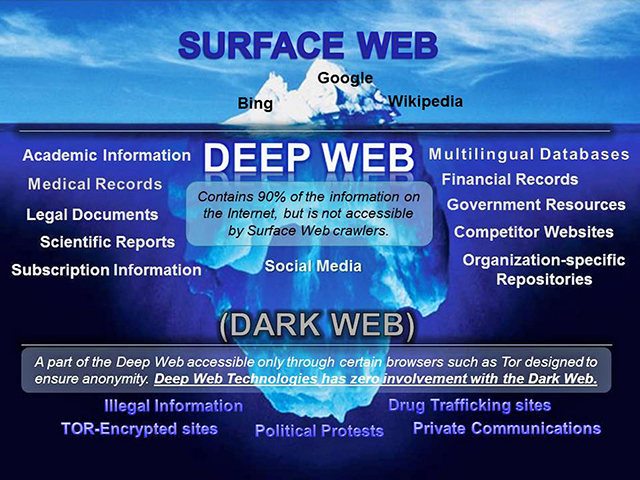
- Surface Web
- Bing
- Wikipedia
- Deep Web
- Academic Information
- Medical Records
- Legal Documents
- Scientific Reports
- Subscription Information
- Social Media
- Multilingual Databases
- Financial Records
- Government Resources
- Competitor Websites
- Organization-specific Repositories
- Dark Web
- Illegal Information
- TOR-Encrypted sites
- Political Protests
- Drug Trafficking sites
- Private Communications
Monday, February 6, 2017
Cascading CSS styles are a little painful to overpower.
Let's say...
- You have some HTML in an app like so:
<div class="dotty">
<table>
<tr>
<td nowrap>I like:</td>
<td>
<table>
<tr>
<td>cats</td>
<td>grapes</td>
</tr>
<tr>
<td nowrap>not dying</td>
<td>Texas</td>
</tr>
</table>
</td>
</tr>
</table>
</div>
- And, your stylesheet looks like this:
.dotty {
padding: 13px;
}
.dotty table {
border: 1px #FF0000 dotted;
}
- Creating something that looks like this:
I like: cats grapes not dying Texas
But you really don't want the cascading effect to put a border on the inner table.
- You just want something like so:
I like: cats grapes not dying Texas
But the dotty class is used pervasively in your application and you dare not alter it. Also, you don't want to write your own dotty because you don't understand what all dotty does because someone else made dotty. What will you do? There are only a few things you can do and they will quickly make you fall out of love with the cascading part of cascading stylesheets as you'll realize that whenever you're clever and you make things cascade that you are in fact painting yourself into a corner that will require others to hack in order to get around your madness. If you're going to have cascading effects they better be small in scope and not applied to, for example, the body tag down. If you just make a new class called nada to apply to the inner table like so:
.nada {
border: none;
}
...you will be disappointed when nothing changes! I'm serious. It makes my nose want to bleed in disbelief but that is how it is. You will find that cascading effects always beat direct effects and thus nothing will change. There are three ways around this and they are all bad. One is like so:
.nada {
border: none !important;
}
Yuck, I feel dirty already. An inline style parameter with border: none; as a value at the second table tag is another solution and it's hard to say which of these two fixes is worse. There is a slightly better third way, and, no, it's not using an id as that won't work either. The third way is to change up the HTML like so:
<div class="dotty">
<table>
<tr>
<td nowrap>I like:</td>
<td>
<div class="nada">
<table>
<tr>
<td>cats</td>
<td>grapes</td>
</tr>
<tr>
<td nowrap>not dying</td>
<td>Texas</td>
</tr>
</table>
</div>
</td>
</tr>
</table>
</div>
...and then have nada like this:
.nada table {
border: none;
}
We can overpower an outer cascading effect with an inner cascading effect.
What do you call the different "threads" in JavaScript if they are not threads?
- Web Workers?*
- browser code threads?
- promises or callbacks?*
* (excludes the main "thread")
First rule of .NET and C#: Forget everything you know about locks and threads and Mutex and what not if you are not making a Windows app. At the web, the UI has one thread. Do not expect IIS to give a different thread to each session as there could be one hundred different sessions and that would then be silly. So, with that in mind, JavaScript isn't using multiple threads either. There is something running in a loop in the background that periodically checks if x, y, and z has happened to match up event causality consequences to the greater reality. My understanding is that this is how Node.js works under the hood too. Clearly there are a lot of psuedothread concerns to think about.
TED stands for Technology, Entertainment and Design
TED Talks are online videos of these high falutin ideas.
Saturday, February 4, 2017
questions marks inside of an *ngIf in AngularJS 2's markup
Alright, the following is pretty straightforward, right? We are going to see the picture of Robert DeNiro if the bar object hanging off the foo object has a baz property hanging off of it that is truthy.
<div *ngIf="foo.bar.baz">
<img src="DeNiro.jpg" />
</div>
If baz is falsey we will not see the picture and if bar just doesn't have a baz property then we will also not see the picture as baz will read as undefined which is, yes, falsey. But what if foo doesn't even have a bar property? What if bar is undefined? Well then the application is gonna crash, right? It will barf red stuff up to the console in Google Chrome Developer Tools. There is a way to prevent a missing bar object from ruining the show like so:
<div *ngIf="foo.bar?.baz">
<img src="DeNiro.jpg" />
</div>
This is kinda like this stuff from C# 6.0. In the C# scenario I think we are just falling over to null if we cannot read forward (rightward) from the question mark, and that made me initially assume the same of Angular 2, but coworkers pointed out to me that undefined will be used instead of null. If bar was explicitly set to null would it be evaluated as null? I'm not sure. This all came up in conversation yesterday because I saw something like this and initially assumed it would blow up if bar were missing...
<div *ngIf="foo.bar?.baz > 7">
<img src="DeNiro.jpg" />
</div>
It turns out that this is completely legitimate. I think undefined is just used in the comparison and maybe that (er, well, null) would lead to a freak out in C# but this isn't C#. You can compare undefined and null to things in JavaScript with greater than and less than signs. Herein it is important to note the distinction between null and undefined. They are both falsey but can nonetheless compare differently.
|
|

Another place where I've struggled to let go my C# head trash is with private versus public at components. If a field or a method is private in a component it is still accessible from the Angular 2 HTML template. You just can't grab ahold of that thing in the Jasmine/Karma/PhantomJS tests or from other TypeScript objects. It differs of course from web forms code behinds where the counterpart would need public accessibility to get used in the ASP.NET markup.
sjaj
AJAX is an acronym for Asynchronous JavaScript and XML, right? AJAJ is sort of offered up as a replacement term in modern times as the X stands for XML and not JSON and, anymore, we just use JSON. I've never once used XML with AJAX, not to my memory. Maybe XML was shepherded around under the hood in that old web forms Update Panel thing, but never have I actually caught XML at JavaScript and made sense of it. Never. Now will this new name ever be embraced? Never. We are all used to and in love with the term AJAX. It just sounds awesome. It's the name of some Trojan War or Greek Myths hero that we can't quite remember and it's the name of that iconic caustic cleaning product.

Manly! What's not to like about the name AJAX? Anyways, I thought of this because I ran into a way in which the beginning of the acronym should be challenged the way the ending really should be. Behold:
var showStopper = function(url) {
var whatever=new XMLHttpRequest();
whatever.open("GET", url, false);
whatever.send(null);
return whatever.responseText;
};
We are not waiting for a promise to come back in the above code. The process will just hang until we get something back. The asynchronous part of the process is replaced with a synchronous one and you could describe this as SJAJ it seems. I didn't know this was even possible. It's not recommended. I saw some sort of warning while I did this about how it was deprecated, and it's not the sort of thing I would normally brush across as I normally never use XMLHttpRequest directly but instead find myself using a framework like jQuery or Angular 2 which has its own, better way of doing AJAJ which I suppose wraps XMLHttpRequest under the hood and doesn't allow for stupid stuff like synchronous calls. The code above just scrapes from a URL, returning whatever may be there, conditionallessly.
Subscribe to:
Posts (Atom)